Freelance social media designers often spend more time on a campaign than their original quotes account for. A client may approve the main creative concept, but the project can still involve multiple platform sizes, resized graphics, layout adaptations, revisions and additional exports. When those tasks are not properly estimated, a seemingly profitable project can become a lot of unpaid work.
That is the problem the Campaign Hours Estimation Kit is designed to address. It is a digital toolkit aimed at freelance social media designers who want a more structured way to calculate production hours, estimate campaign costs and prepare client quotes.
But is it worth the advertised $99.99 price? What exactly comes inside the package? And would a freelancer be better off creating their own spreadsheet or using general-purpose project management tools?
In this Campaign Hours Estimation Kit review, we’ll examine the advertised tools, how the system is intended to work, its pricing, potential advantages, limitations and alternatives. We’ll also look at the type of freelancer who may find it useful.
Affiliate disclosure: This article contains affiliate links. We may earn a commission if you purchase through these links, at no additional cost to you. This review is based on the seller’s published product information rather than independent hands-on testing. Product details and promotional terms should be confirmed on the official sales page before purchasing.
Table of Contents
What Is Campaign Hours Estimation Kit?
Campaign Hours Estimation Kit is a downloadable resource package created for freelance social media designers. Its central purpose is to help users approach campaign pricing and production-hour estimation more systematically.
The problem it addresses is familiar to many independent designers: quoting a campaign based only on the main creative concept without accounting for all the deliverables required to complete the project.
For example, a client might request one campaign concept that needs to be adapted into several formats for different social media platforms. Each adaptation can involve adjustments to dimensions, text placement, image cropping, composition and exports.
Those additional tasks take time. However, if they are not included in the original estimate, the designer may end up doing more work without receiving additional payment.
The Campaign Hours Estimation Kit is intended to help freelancers consider these production requirements before sending a quote.
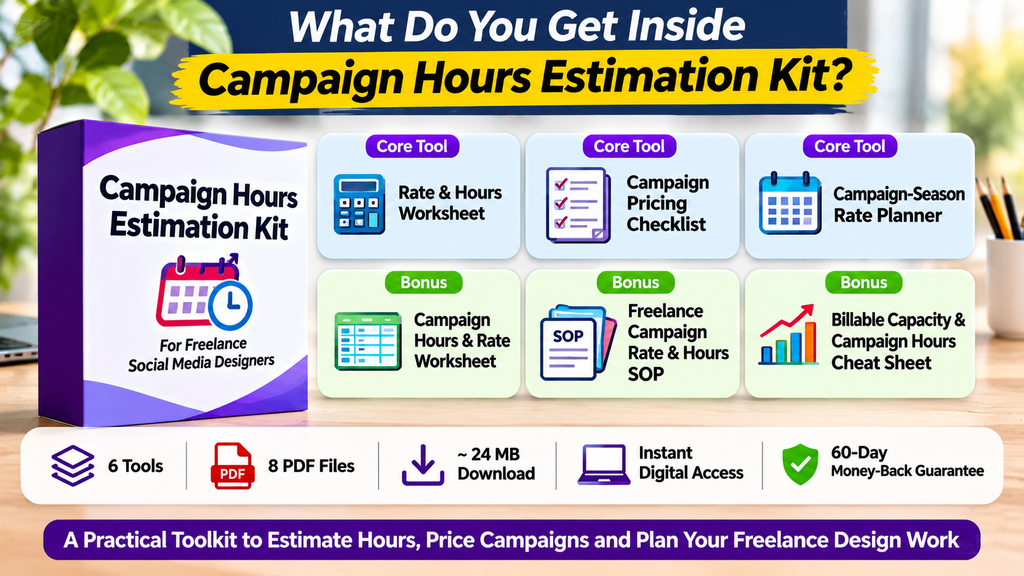
According to the official product page, the package contains six tools across eight PDF files, including worksheets, a pricing checklist, a campaign-season planner and additional resources.
The product is a digital PDF toolkit, not a subscription-based project management application or automated quoting platform. Its value depends on whether the included worksheets and procedures fit the way you manage your freelance work.
What Do You Get Inside Campaign Hours Estimation Kit?
The seller advertises six resources divided into three core tools and three bonuses. Here is a closer look at the published package description.
1. Social Media Designer Rate & Hours Worksheet
This worksheet is designed to help freelancers calculate their baseline hourly rate and estimate the time required for campaign work.
Rather than selecting a rate based solely on what competitors charge, the advertised approach considers factors such as monthly income requirements, business expenses and available billable hours.
This matters because not every working hour is a billable hour. Freelancers also spend time on administration, marketing, client communication and other activities that need to be accounted for when setting sustainable rates.
A structured worksheet may help make these calculations more deliberate.
2. Campaign Pricing Checklist
The Campaign Pricing Checklist is intended to help designers examine the work behind a client campaign before preparing a quote.
According to the seller, it helps users estimate the hours associated with different deliverables and format variations, consider the client’s budget and establish the scope of the work.
This is particularly relevant when a campaign includes several platform adaptations rather than a single design file.
Clearly defining deliverables and revision limits can also help prevent misunderstandings later in a project.
3. The Campaign-Season Rate Planner
Freelance workloads are not always consistent throughout the year. Some periods can be busy, while others may have fewer client projects.
The Campaign-Season Rate Planner is designed to help users consider their rates, available capacity and campaign workload across busier and slower periods.
For freelancers who depend on a varying flow of client projects, planning around available production hours can be useful when deciding how much additional work to accept.
4. Bonus: Campaign Hours & Rate Worksheet
This additional worksheet is intended to help users compare possible hourly rates against their income targets and campaign requirements.
It provides another way to consider the relationship between the rate a freelancer charges and the amount of time required to deliver a project.
5. Bonus: Freelance Campaign Rate & Hours SOP
The seller also includes a standard operating procedure covering the process from calculating billable capacity to preparing a final campaign quote.
One interesting aspect of the advertised procedure is its approach to situations where a client’s budget is below the proposed fee. Rather than automatically reducing the rate, the suggested approach is to consider reducing the project scope.
That is a useful commercial principle for independent designers to consider.
6. Bonus: Billable Capacity & Campaign Hours Cheat Sheet
The final resource is a one-page reference sheet containing formulas related to billable capacity, hourly rates and campaign estimates.
A quick-reference document can be convenient when preparing estimates regularly and wanting to refer to the same calculations without repeatedly searching through longer worksheets.
How many files are included?
The seller advertises:
- Six tools.
- Eight PDF files.
- Approximately 24 MB of downloadable resources.
- Print and fillable versions of certain worksheets.
The package is advertised as an instant digital download. Check the official product page for the latest package description before ordering.
How Does Campaign Hours Estimation Kit Work?
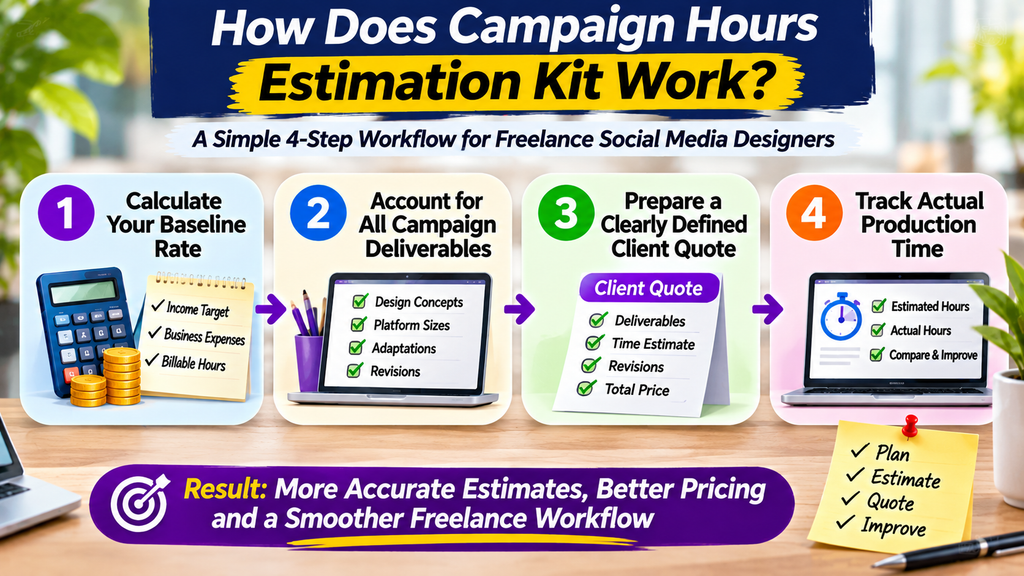
The seller presents the toolkit as a four-stage process. The general idea is to establish a rate, estimate the work, prepare a clearly defined quote and then compare actual production time with the original estimate.
Step 1: Calculate your baseline rate
Before accepting a project, a freelancer needs to understand what they must earn to operate sustainably.
This involves considering personal income requirements, business expenses and the number of hours that can realistically be billed each month.
For example, a designer who works 40 hours per week does not necessarily have 40 billable hours per week. Time spent finding clients, handling emails, managing accounts and performing administration also needs to be considered.
The Rate & Hours Worksheet is intended to help users approach this calculation more systematically.
Step 2: Account for all campaign deliverables
A campaign may contain more production work than the initial creative concept suggests.
Imagine a client requesting a promotional campaign with a master graphic, multiple social media formats and several platform-specific adaptations.
Instead of treating all these deliverables as one general design task, the freelancer should list them individually and estimate the time involved.
This is where the Campaign Pricing Checklist is intended to help.
Step 3: Prepare a clearly defined client quote
Once the deliverables and production hours have been estimated, the next task is to prepare a quote.
A clear quote should explain what the client is paying for, which formats are included, how many revisions are covered and what additional work may cost.
The seller’s approach encourages designers to consider the client’s budget against the estimated production hours rather than simply accepting an amount that may not cover the work involved.
Step 4: Track actual production time
An estimate is only useful when it can be compared with what actually happened.
After completing a campaign, the freelancer can compare estimated production hours with the time spent on the project.
This information may help identify activities that regularly take longer than expected and improve estimates for future assignments.
The purpose is to make future pricing decisions more informed rather than repeatedly relying on memory.
Campaign Hours Estimation Kit Features and Potential Benefits
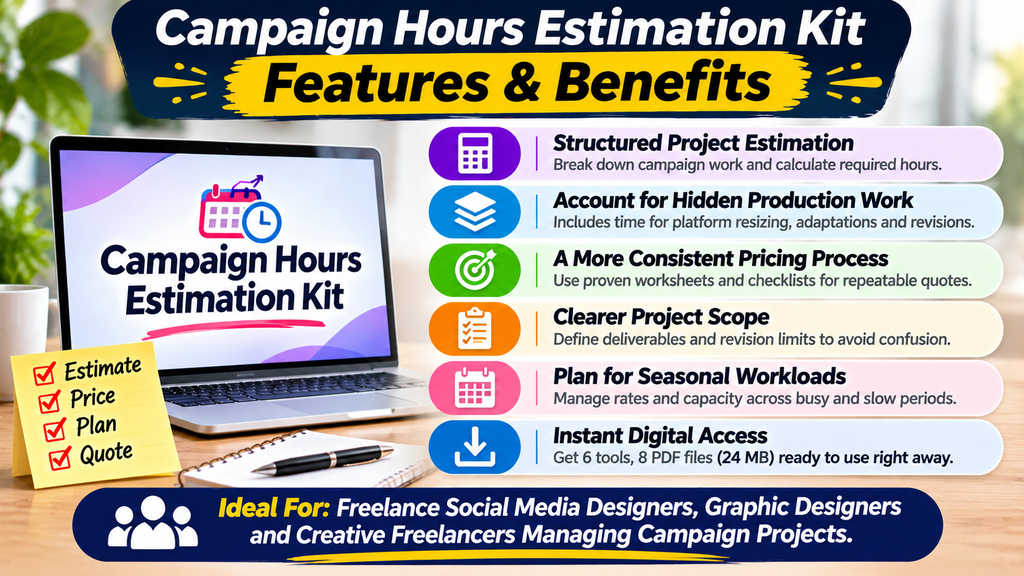
The following are the main areas where the advertised toolkit may be useful.
More structured project estimation
Instead of relying entirely on intuition, designers can use worksheets to break campaign work into smaller components and consider the time required for each deliverable.
This can be helpful when projects involve several creative formats.
Better awareness of hidden production work
Platform resizing and asset adaptations can be easy to underestimate.
A campaign that appears to require only one main design may involve several additional production tasks. Listing these requirements before quoting can help freelancers account for the work more accurately.
A more consistent pricing process
Having a repeatable method for calculating rates and campaign hours may reduce the temptation to make pricing decisions from scratch for every client.
Consistency does not automatically make a quote profitable, but a clearly defined process can make it easier to review the assumptions behind each estimate.
Clearer project scope
Defining deliverables and revision limits in advance can help freelancers communicate expectations with clients.
It also gives both parties a clearer basis for discussing additional work that falls outside the original agreement.
Digital access
The package is advertised as a downloadable collection of PDF files. There is no physical shipment or software installation requirement.
The seller says that the fillable versions can be completed digitally using a PDF reader, while print versions can be used on paper.
Campaign Hours Estimation Kit Pricing: How Much Does It Cost?
Pricing is an important consideration when deciding whether this toolkit is suitable for your freelance business.
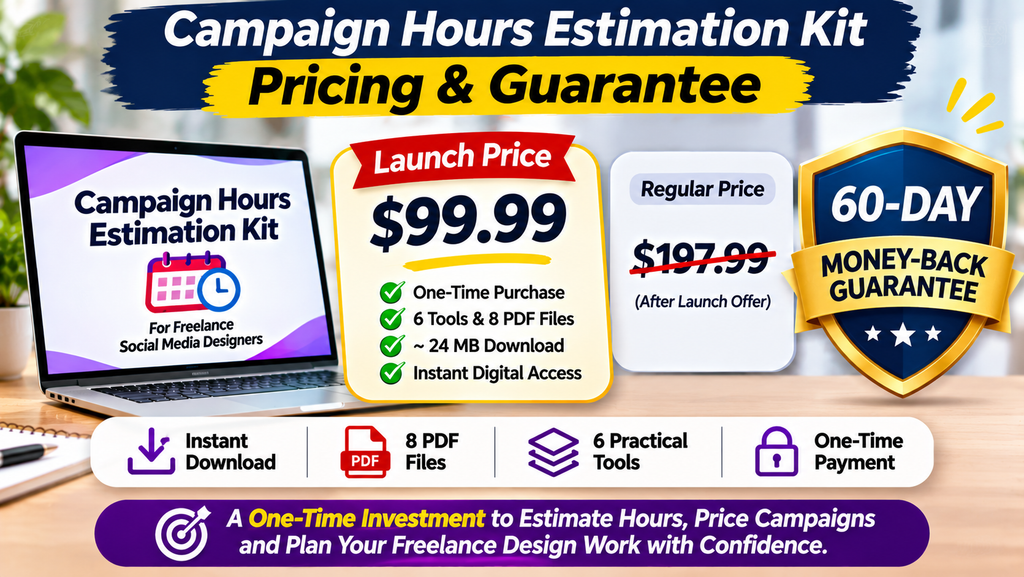
At the time of this review, the official product page displays:
- Advertised launch price: $99.99
- Advertised subsequent price: $197.99
- Payment type: One-time purchase
- Delivery: Digital download
- Advertised refund period: 60 days
The seller describes the $99.99 amount as a launch price for the first 250 kits, after which the stated price becomes $197.99.
Promotional availability can change. Do not assume that the introductory offer will remain available when you visit the checkout page.
You can check the current offer and purchase terms here:
View Campaign Hours Estimation Kit – Official Offer
Is $99.99 a reasonable price?
That depends on how frequently you handle campaigns and whether the included resources address a genuine weakness in your existing workflow.
A freelancer who regularly prepares multi-format social media campaigns may find structured estimation worksheets more relevant than someone who only creates occasional individual graphics.
Consider these questions before purchasing:
- Do you regularly underestimate the hours required for client projects?
- Do you sometimes forget to include resizing and format adaptations in your quotes?
- Do you struggle to calculate a sustainable hourly baseline?
- Would a repeatable pricing and estimation process improve your current workflow?
- Do you prefer ready-made PDF resources over creating your own spreadsheets?
If several of these questions describe your situation, examining the package may make sense.
However, if you already have a reliable system that accounts for deliverables, production hours, revisions and pricing, the kit may offer less additional value.
Is Campaign Hours Estimation Kit Legit?
This is a reasonable question to ask before purchasing any digital product.
The Campaign Hours Estimation Kit has an official sales page that describes its intended audience, package contents, pricing and advertised refund policy.
The product page also shows examples of the resources, including the Rate & Hours Worksheet, Campaign Pricing Checklist, Campaign-Season Rate Planner and other materials.
However, buyers should distinguish between what the seller advertises and independently verified product performance.
I have not independently tested the downloadable files or verified customer results. Therefore, I would not claim that the kit has been proven to increase income, generate more clients or eliminate every pricing problem.
Here are a few sensible checks to make before purchasing:
- Review the individual resources displayed on the official sales page.
- Confirm the current price and full checkout details.
- Check that the digital PDF format suits your preferred working process.
- Read the advertised money-back guarantee and its applicable conditions.
- Keep your order confirmation and purchase details.
What about the 60-day money-back guarantee?
The seller advertises a 60-day money-back guarantee.
According to the product page, refund requests can be made through ClickBank order support within the stated 60-day period.
As with any digital purchase, check the terms and refund instructions that apply to your transaction. Do not rely solely on promotional wording.
Campaign Hours Estimation Kit Pros and Cons
After reviewing the advertised package and its intended workflow, here are the main advantages and considerations.
Pros
- Designed specifically for freelance social media designers.
- Includes six tools across eight PDF files.
- Provides resources for hourly-rate calculations and campaign estimation.
- Addresses the often-overlooked work involved in platform resizing and adaptations.
- Includes a campaign pricing checklist.
- Provides a planning resource for seasonal workload and capacity.
- Includes additional worksheets, an SOP and a quick-reference cheat sheet.
- Advertised instant digital delivery.
- Seller advertises a 60-day money-back guarantee.
Cons and considerations
- It is a PDF toolkit, not an automated quoting or project management application.
- The resources require users to apply the calculations and procedures themselves.
- Its specialised focus may make it less useful for freelancers working in unrelated service categories.
- Buyers who already have a detailed estimation process may not need another set of worksheets.
- The advertised price may be relatively high for beginners with limited freelance income.
- The value depends on whether the tools fit the buyer’s actual workflow.
Overall, the toolkit appears most relevant to freelancers who want a dedicated framework for pricing social media design campaigns rather than a general-purpose productivity application.
Who Should Buy Campaign Hours Estimation Kit?
The product’s intended audience is fairly specific. It is designed around the work performed by freelance social media designers.
Freelance social media designers
This is the most directly relevant group.
Designers who produce campaign creatives across several social platforms may benefit from having a more structured process for estimating the work behind each format.
Independent graphic designers
Graphic designers who regularly create marketing assets, promotional campaigns and multi-format visuals may also find the estimation approach relevant.
However, the package is specifically positioned for social media design, so buyers should check the examples and worksheets before deciding whether they suit their services.
Beginners building a freelance business
New freelancers may find it useful to think through their hourly requirements, billable capacity and pricing process before accepting more client work.
It is important to remember that the resources do not replace practical experience, sound business judgement or effective client communication.
Experienced freelancers
Established freelancers who still estimate projects informally may find the pricing worksheets and campaign-planning resources worth examining.
Those who already use a detailed costing process should compare the package with their existing tools before paying for it.
Who Should Avoid Campaign Hours Estimation Kit?
Not every freelancer needs a dedicated campaign estimation toolkit.
You may want to skip it if:
- You rarely work on social media design campaigns.
- Your projects involve only simple, single-format graphics.
- You already have an accurate and repeatable pricing spreadsheet.
- You expect software to calculate and generate quotes automatically.
- You are looking for guaranteed clients, revenue or business growth.
- You prefer building your own system using free tools.
The important distinction is that this product is intended to support an existing freelance business process. It is not a shortcut to building a client base.
Best Campaign Hours Estimation Kit Alternatives
If you are unsure about purchasing a specialised PDF package, there are other tools you can use to organise projects, estimate work and record time.
These alternatives do not necessarily offer the same combination of resources, but they may be appropriate depending on your needs.
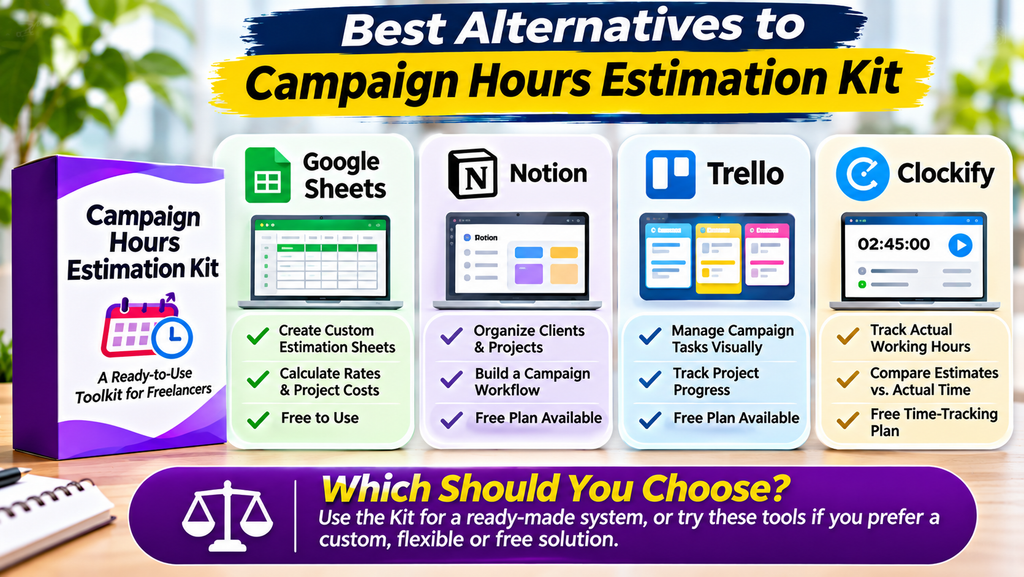
1. Google Sheets
Google Sheets is a practical starting point for freelancers who prefer to build their own estimation system.
You can create a spreadsheet containing:
- Client and project information.
- Individual campaign deliverables.
- Estimated hours per task.
- Hourly rates.
- Additional production costs.
- Revision allowances.
- Final project quotes.
- Estimated versus actual hours.
The main advantage is flexibility. You can design your calculations around your own services without purchasing a specialised toolkit.
The disadvantage is that you need to create and maintain the system yourself.
2. Notion
Notion is a workspace for organising information, documentation, databases and projects.
Freelancers can use it to maintain client records, document project scopes, organise campaign tasks and build databases for upcoming assignments.
Its free plan may be sufficient for an individual who wants a basic organization system. More advanced capabilities are available through paid plans.
Notion is particularly useful for freelancers who prefer having project information, documentation and task management in one workspace.
However, it is a general-purpose workspace rather than a dedicated social media campaign pricing toolkit.
3. Trello
Trello uses visual boards, lists and cards to organise work.
A freelancer could create a board for each client campaign and organise tasks into stages such as:
- New project requests.
- Estimation and quotation.
- Design production.
- Client review.
- Revisions.
- Final delivery.
Trello has a free plan, making it an accessible option for basic visual project organisation.
Its main limitation for this comparison is that organising tasks is not the same as calculating a sustainable hourly rate or estimating every design adaptation.
4. Clockify
Clockify is a time-tracking tool that can help freelancers record how long they spend on different projects and activities.
It can be useful after completing a client assignment because actual time records can be compared with the hours originally estimated.
Clockify advertises a free time-tracking plan, alongside paid plans with additional capabilities.
This makes it particularly relevant for freelancers who want to understand where their working hours go.
However, tracking actual hours does not automatically establish a suitable project price. You still need a method for calculating rates, estimating deliverables and defining client scope.
5. A Custom Freelance Pricing Spreadsheet
Another alternative is to create a simple estimation system using a spreadsheet and a few consistent business rules.
For example, you could develop a custom process that includes:
- A minimum hourly rate.
- A list of standard design services.
- Estimated production time for each service.
- Separate allowances for adaptations and revisions.
- A project scope document.
- A record of actual hours.
This option gives you complete control and avoids purchasing another digital toolkit.
The trade-off is that building an effective system takes time and requires you to decide which calculations and procedures your business needs.
Campaign Hours Estimation Kit vs. Free Alternatives: Which Should You Choose?
The right choice depends on what problem you are trying to solve.
Choose Campaign Hours Estimation Kit if you want a specialised collection of ready-made resources focused on social media campaign hours, rate calculations and pricing procedures.
Choose Google Sheets if you prefer to build your own cost and time estimation formulas.
Choose Notion if you want a workspace for client information, documentation and project organisation.
Choose Trello if your main priority is visual task and campaign management.
Choose Clockify if you want to record actual working hours and examine how your time is distributed.
You can also combine these approaches. For example, a freelancer might use a spreadsheet to calculate quotes, Trello to organise production tasks and Clockify to track actual time.
There is no requirement to use a paid toolkit if an existing free workflow already meets your needs.

Frequently Asked Questions About Campaign Hours Estimation Kit
1. What is Campaign Hours Estimation Kit?
Campaign Hours Estimation Kit is a digital resource package designed for freelance social media designers. The seller advertises six tools across eight PDF files to help users calculate rates, estimate campaign production hours and prepare client quotes.
2. How much does Campaign Hours Estimation Kit cost?
The official product page currently advertises a launch price of $99.99 and a subsequent price of $197.99. Promotional pricing can change, so check the seller’s page for the current offer before purchasing.
3. What is included in Campaign Hours Estimation Kit?
The advertised package includes the Social Media Designer Rate & Hours Worksheet, Campaign Pricing Checklist, Campaign-Season Rate Planner, Campaign Hours & Rate Worksheet, Freelance Campaign Rate & Hours SOP and Billable Capacity & Campaign Hours Cheat Sheet.
4. Is Campaign Hours Estimation Kit a digital download?
Yes. The seller advertises instant digital delivery consisting of eight PDF files with a combined size of approximately 24 MB. No physical shipment is involved.
5. Who should use Campaign Hours Estimation Kit?
It is primarily intended for freelance social media designers. Independent graphic designers and creative freelancers who regularly handle multi-format marketing campaigns may also find some of the resources relevant.
6. Does Campaign Hours Estimation Kit include a money-back guarantee?
The seller advertises a 60-day money-back guarantee. Review the official refund terms and purchase instructions before ordering.
7. Is Campaign Hours Estimation Kit suitable for beginners?
It may be relevant to beginners who want to develop a structured approach to pricing and campaign-hour estimation. However, the resources do not replace practical design experience or the need to learn how to manage clients.
8. Is Campaign Hours Estimation Kit software?
No. It is advertised as a collection of downloadable PDF worksheets, checklists, planning resources and procedures. It should not be confused with an automated software application.
9. Does Campaign Hours Estimation Kit guarantee higher freelance income?
No income or business-growth result should be assumed. The toolkit is intended to support estimation and pricing decisions, but actual results depend on a freelancer’s services, rates, client base, project scope and implementation.
10. Are there free alternatives to Campaign Hours Estimation Kit?
Yes. Google Sheets can be used to build custom pricing calculations, Notion can organize project information, Trello can manage tasks and Clockify can track working hours. These tools have different purposes and do not necessarily reproduce the specialized resources included in the kit.
Final Verdict: Is Campaign Hours Estimation Kit Worth $99.99?
After reviewing the seller’s published product description, I would consider Campaign Hours Estimation Kit a specialised resource package for freelance social media designers who want to improve the way they approach campaign pricing and production-hour estimates.
Its main appeal is its focus on a specific problem: the work that can be overlooked when quoting social media campaigns, particularly platform adaptations, additional formats and revisions.
The package includes three core resources and three bonuses, covering rate calculations, campaign pricing, seasonal planning, estimation procedures and billable capacity.
That is a more specialised offering than a general-purpose task manager or time tracker.
However, it is still a collection of PDF resources. It does not automatically run your freelance business, find clients, generate income or guarantee that every project will be profitable.
My recommendation: If you regularly handle multi-format social media campaigns and need a more structured way to estimate hours and prepare quotes, the toolkit is worth examining. If you already have a reliable pricing system or only handle occasional design jobs, free alternatives may be enough.
Before deciding, review the complete package contents and confirm the current price and refund terms.
Ready to Explore Campaign Hours Estimation Kit?
Visit the official offer page to review the resources, check the current price and read the seller’s purchase terms.
CHECK CAMPAIGN HOURS ESTIMATION KIT – VIEW THE CURRENT OFFER
This is an affiliate link. We may earn a commission if you purchase through it, at no additional cost to you.
You can also read our supporting Campaign Hours Estimation Kit review for additional information about the product.