If you’re looking into ClickFunnels for beginners in 2026, the platform can feel like a lot at first. There are dozens of features, several plans, and almost every tutorial assumes you already know what a funnel is.
I’m going to keep this simple. Below is what I’d tell a friend who is starting ClickFunnels from zero: what it is, what it costs, how to build your first funnel, and which mistakes waste the most time and money.
This ClickFunnels for beginners guide is for you if you have no funnel experience, a limited budget, and no technical background. You don’t need any of those things to get started.
Table of Contents
What ClickFunnels Actually Is (and What It Isn’t)
ClickFunnels is software that helps you guide a visitor through a set of pages toward one action. That action might be joining your email list, booking a call, or buying a product.
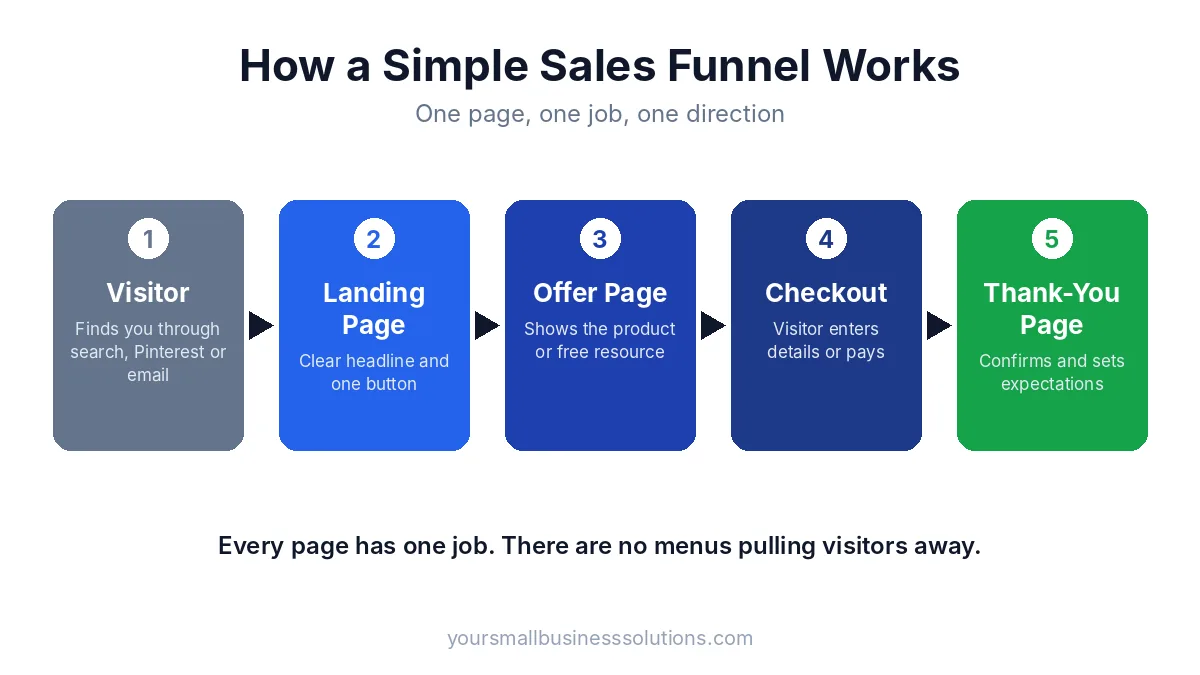
That set of pages is called a funnel. A typical one has a landing page, an offer page, a checkout page, and a thank-you page. Each page has one job, and there are no distracting menus pulling people away.
This is the main difference between a funnel and a regular website. A website lets visitors wander. A funnel keeps them moving in one direction. If you’re not sure which one you need, I covered that in my post on whether you need a funnel builder or just a website.
One thing ClickFunnels isn’t: a magic money machine. It’s a tool. It won’t create demand for an offer nobody wants, and it won’t send you traffic on its own.
Who Should Use ClickFunnels for Beginners in 2026 (and Who Should Wait)
ClickFunnels for beginners works well when you already have something to sell, or are about to. That includes:
- Coaches and consultants who want to book more calls
- Affiliate marketers who want to capture leads before sending people to an offer
- Course creators and info-product sellers
- Local and small business owners who want a simple lead or booking page
I’d suggest waiting if you don’t have an offer yet, have no plan to get visitors, or aren’t ready to spend a few hours a week learning the tool. In that case, spend your first weeks on the offer and the audience. The software can come after.
Start With Your Offer, Not the Software
This is the first piece of ClickFunnels for beginners advice I’d give anyone. Before you open ClickFunnels, answer three questions on paper:
- What am I selling, or giving away? Pick one product, service, or free resource.
- Who is it for? Be specific. “Small business owners” is vague. “Salon owners who want more bookings” is clear.
- What is the one action I want visitors to take? Join a list, book a call, or buy.
Beginners often spend weeks tweaking page colors before they’ve decided what the page is selling. A simple page with a clear offer beats a beautiful page with a confusing one every time.
ClickFunnels for Beginners: What It Costs in 2026
ClickFunnels is not the cheapest tool out there, so it’s worth knowing the numbers before you start. At the time of writing, the current plans are Launch, Scale, Optimize, and Dominate. Launch is the entry plan at about $97 per month, Scale is about $197, and Optimize is about $297. Dominate is a much larger annual plan aimed at bigger businesses. Annual billing usually lowers the monthly cost. ClickFunnels explains how the current plans compare with its older ones in its support article on pricing plans.
Prices change, so always confirm on the official ClickFunnels pricing page before you buy.
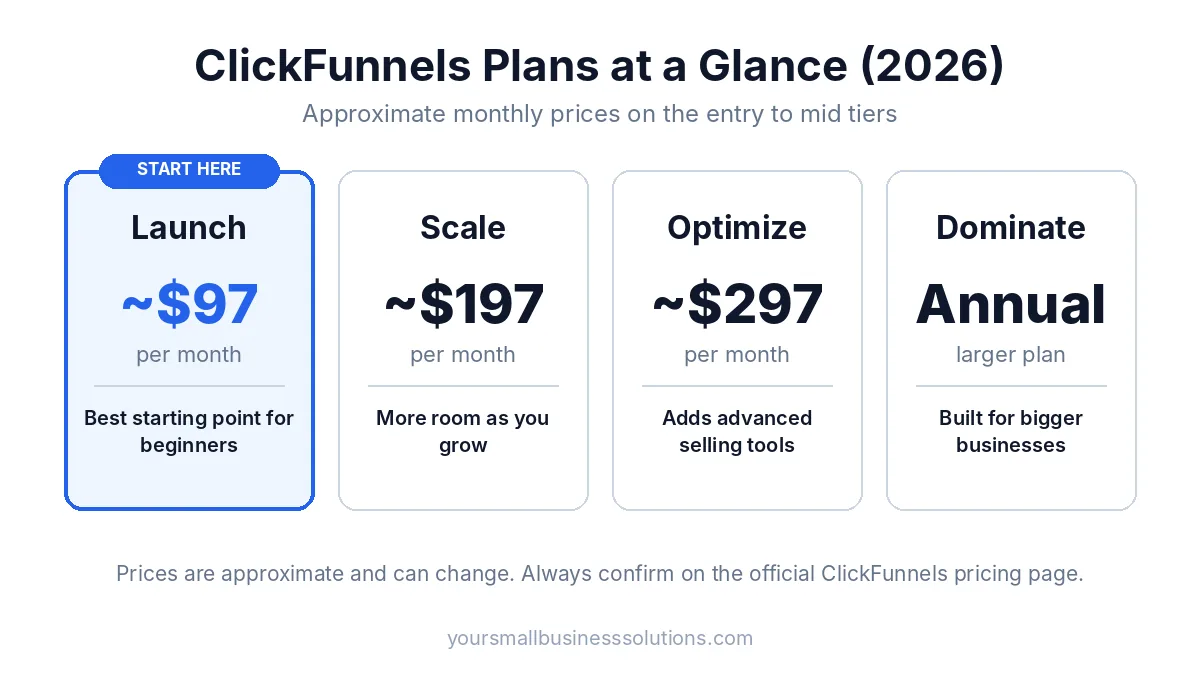
My ClickFunnels for beginners advice on pricing is simple: start on the entry plan. You can upgrade later when you actually hit a limit. Most beginners never need the top plans in their first year. Also keep in mind that email sending may carry a small extra cost, so check the current rate and factor it into your budget.
If the monthly price is what’s holding you back, there’s a lower-risk way to begin. You can start with the ClickFunnels 3-month trial, which gives you time to build and test a real funnel instead of rushing through a short free trial.
Start the ClickFunnels 3-month trial here
How to Set Up Your Account the Right Way
Once you’re in, resist the urge to explore every menu. Do these four things first:
- Create your workspace. Add your business name and basic details.
- Connect a domain. A custom domain looks more trustworthy than a default link.
- Set up payments. Connect a payment gateway now so you’re ready when you launch an offer.
- Set your sender details. Add your name and email address so follow-up emails go out properly.
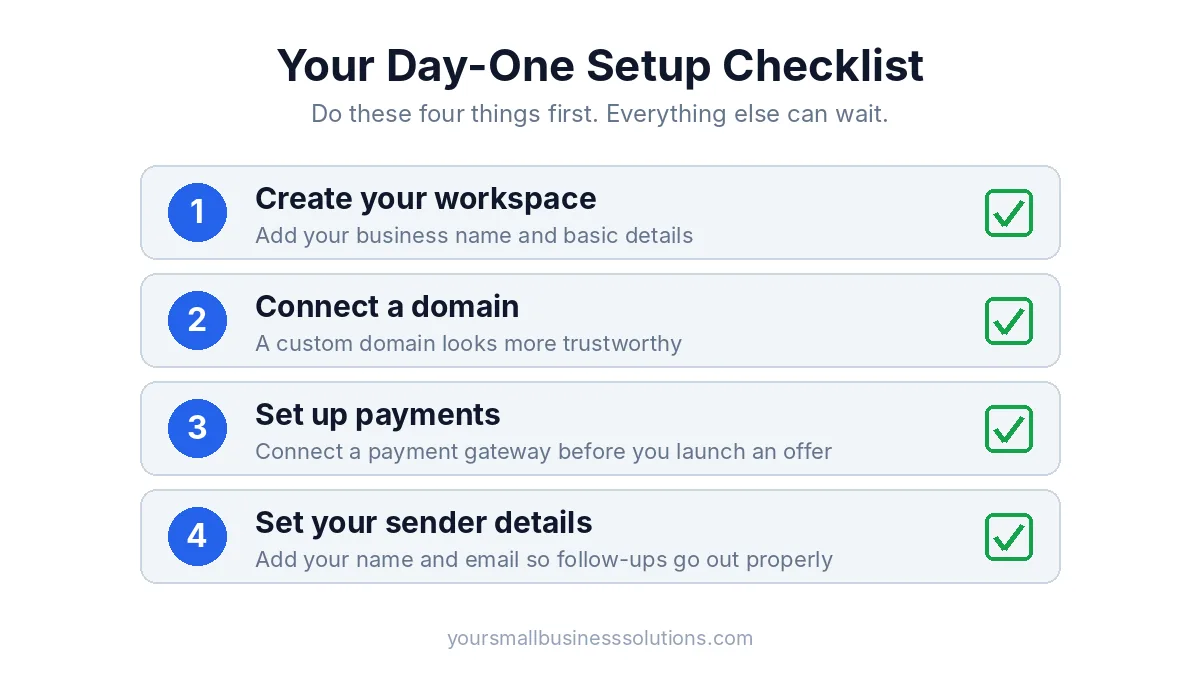
That’s enough for day one. Everything else can wait until your first funnel is live.
ClickFunnels for Beginners: Build Your First Funnel Step by Step
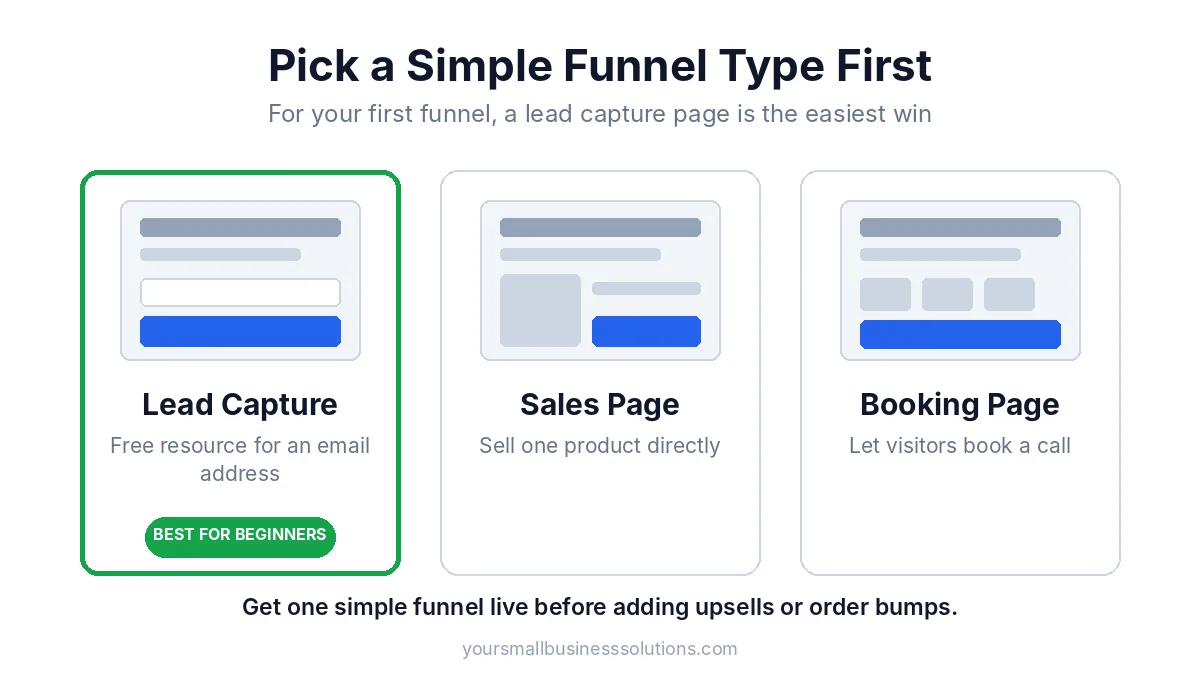
If you want a ClickFunnels tutorial for beginners, this is the core of it. Keep your first funnel small. I’d recommend a lead capture funnel: one page that offers something free in exchange for an email address, and one thank-you page.
Here’s how to build it:
- Create a new funnel and choose a lead capture or opt-in template.
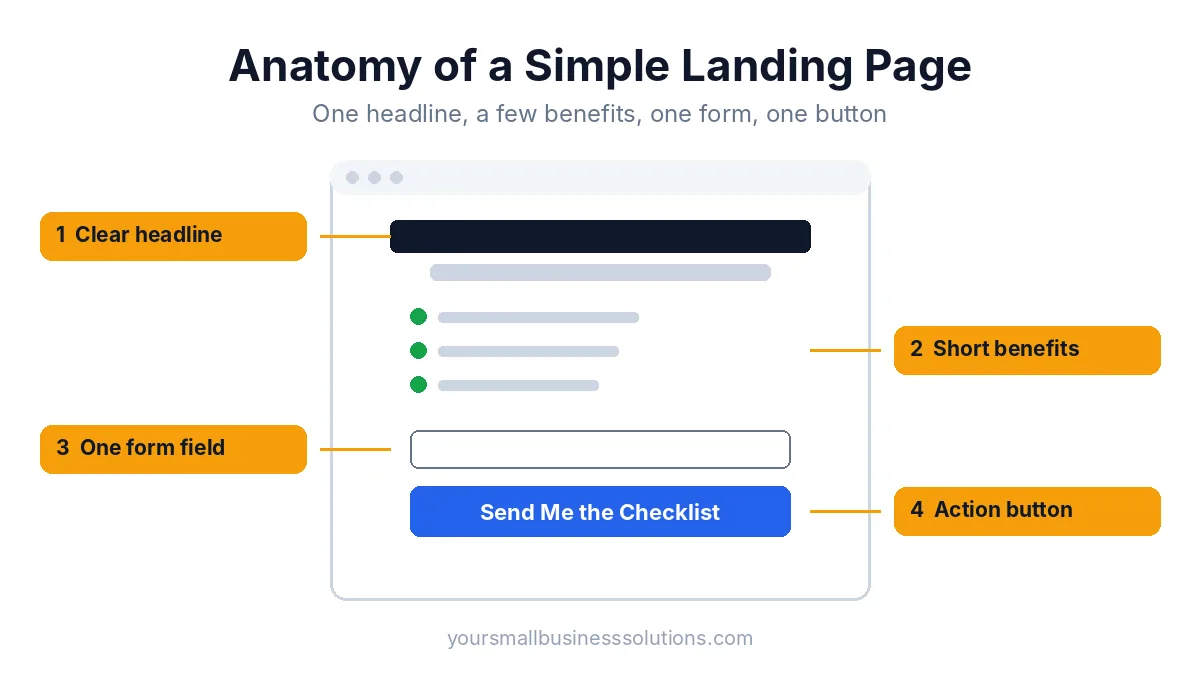
- Write one clear headline that says what the visitor gets and why it helps them.
- Add a short description with two or three benefits. Keep it brief.
- Add one form and one button. The button text should say what happens next, such as “Send Me the Checklist.”
- Edit the thank-you page so it confirms the signup and tells people what to expect.
- Set up a simple follow-up email that delivers the free resource.
- Test everything on your phone and on a computer. Sign up with your own email and check every step.
Once this funnel works, you can add a paid offer, an order bump, or a sales page. Don’t start with those. Get one simple funnel live first. For a more detailed walkthrough with screenshots, see my guide on how to build your first funnel in ClickFunnels.
Beginner Mistakes I’d Help You Avoid
These are the ClickFunnels for beginners mistakes I see most often:
- Building something complicated too soon. Multi-step funnels with upsells and downsells can wait.
- Putting too many choices on a page. One page, one goal, one button.
- Skipping mobile testing. Most visitors will see your page on a phone.
- Spending weeks on design and zero on traffic. A decent page with visitors beats a perfect page with none.
- Upgrading too early. Pay for a bigger plan only when you hit a real limit.
- Not tracking anything. At minimum, check how many people visit your page and how many sign up.
Where Your Traffic Will Come From
Every ClickFunnels for beginners setup needs visitors, so plan your traffic early. Here are the main options:
- Search (SEO): Blog posts that answer questions your audience is already searching for.
- Pinterest: Useful for evergreen content that keeps sending visitors for months.
- LinkedIn: Works well if you serve other businesses or professionals.
- Email: Your list is the most reliable traffic source you’ll own.
- Paid ads: Only worth it after your funnel already converts. Don’t pay to send visitors to an untested page.
Pick one or two and stick with them for a few months. If you want more ideas, read my guide on how to increase website traffic fast.
How AI Tools Can Speed Up Your Learning Curve
You don’t have to write everything from scratch. AI tools can help you draft headlines, rewrite page copy, brainstorm lead magnet ideas, and write follow-up emails. Use them for first drafts, then edit in your own voice so it sounds like you.
I go deeper on this in my post on the AI tools I use in my ClickFunnels workflow.
Is ClickFunnels Worth It for a Beginner in 2026?
Whether ClickFunnels for beginners is worth it depends on where you are. ClickFunnels is worth it if you have an offer, you’re ready to build a simple funnel, and you plan to drive traffic to it. The templates and built-in tools save a lot of setup time, and having pages, forms, and checkout in one place keeps things simple.
It’s probably not worth it yet if you’re still deciding what to sell, or if a basic website would do the job. Be honest with yourself about which group you’re in.
If you want a closer look at the platform’s pros and cons, read my full ClickFunnels affiliate program review.
Frequently Asked Questions
Is ClickFunnels good for beginners?
Yes, if you start small. The templates and guided editor make it approachable, but the price and the number of features can feel heavy. Begin with one simple funnel and ignore the advanced tools at first.
How long does it take to learn ClickFunnels?
Most beginners can build a basic lead capture funnel within a few days of focused effort. Getting comfortable with the full platform takes a few weeks.
Can I use ClickFunnels without a product?
Yes. You can build a funnel that collects leads for your own email list, or one that promotes someone else’s product as an affiliate. You still need a clear offer to put on the page.
Is there a ClickFunnels free trial?
ClickFunnels has offered a short free trial, and you can also start with the 3-month trial linked in this post, which gives you more time to test a real funnel. Trial terms can change, so check the details on the sign-up page. For a side-by-side look, see ClickFunnels free trial vs the 3-month offer.
Do I need a separate email tool?
Not necessarily. ClickFunnels includes email features, so you can start there. Some people prefer a dedicated email platform later as their list grows.
Final Thoughts
If I had to sum up ClickFunnels for beginners in three points, it would be these:
- Decide on your offer before you touch the software.
- Build one simple funnel and get it live.
- Plan your traffic from day one.
That’s it. Don’t overthink it, and don’t try to learn everything at once. A small funnel that’s live and getting visitors will teach you more than weeks of watching tutorials.
If you’re ready to try it, the 3-month trial gives you enough time to build, test, and improve your first funnel.